Showing posts with label Technology. Show all posts

Monday, May 06, 2013

One Day Conference "Evolving Role of IT for Risk and Assurance Professionals " by ISACA Sri Lanka Chapter was a success..

ISACA Sri Lanka Chapter successfully conducted One Day conference under the theme of "Evolving Role of IT for Risk and Assurance Professional" today (06/05/2013) at Hilton Colombo Residences. This event was well attended by Risk, Security, Compliance, Governance and Audit professionals in many financial, manufacturing, and consultancy sectors. There were 5 different speakers covering different aspects of evolving role of IT for risk and assurance professionals. Topics included,

  1. Mobile banking risks & challenges by Mr. Sujith Christy
  2. Case study on financial sector fraud and forensic by Mr. M. Asokan
  3. Project management for IT projects by Dr. Madhu Fernando
  4. New media & digital culture by Mr. Conrad Dias 
  5. Emerging card based threats in financial sector by Mr. Asanka Fernando


Thursday, May 02, 2013

Micro Actyon

Micro Actyon XDi 200

2009 brand new. Agent maintained. Only 18500 km done. Genuine mileage and only Actyon in town with low mileage. All parts are in original condition. Grand white, Full option, Triptronic, 4WD, Diesel, R/Key, CD, Multifunctional steering wheel, Reverse sensor, Black and teak interior, retractable mirrors. Vehicle in mint condition.


Evolving Role of IT for Risk and Assurance Professionals

This is a full day conference scheduled to be held at 6th May, 2013 at Hilton Colombo Residence.


Google Glass Hacked...!

Google glass made very interesting headlines during last couple of months. There was lot of expectations and anticipation regarding this new piece of device from Google. But, disappointing to note, that this testing device been jailbroken by infamous Android and iOS hacker named Jay Freeman (aka Saurik)

http://www.kitguru.net/channel/joseph-mcdonnell/google-glass-jailbroken-hacker-says-security-is-ineffective/#.UYDeGcIoFLc.facebook

Tuesday, March 13, 2012

Kia Picanto 2012


Kia Picanto is very stylish compact car which can easily accommodate 4 average size adults. This new design with the latest features capture the current market quickly. Very rarely we see a latest Picanto in Sri Lankan roads, but there are more than 180 car orders placed at the moment and will populate our roads with Kia Picanto 2012 model in few months time.

Kia Picanto comes in 4 speed auto and 5 speed manual. There are three engine types.

KAPPA 1.2 MPI Engine - manual
max 87 ps at 6,000 rpm

KAPPA 1.0 MPI Engine - manual
max 69 ps at 6,200 rpm

KAPPA 1.0 FFV Engine
max 80 ps at 6,200 rpm


Tuesday, October 25, 2011

Why penetration testing information should be destroyed?

Penetration testing is a sensitive testing mechanism against organizational assets. Penetration testing focuses on the current infrastructure of an organization network and its weaknesses. This test is able of identified most sensitive information security weaknesses of organizations’ network infrastructure. This sensitive information is very critical to organizations and protecting this from unwanted hands is utmost priority. When a penetration testing assignment is underway, it is important to reveal most of the business critical operations, information, critical assets, resource persons, etc to penetration testing team. On the other hand, during their penetration testing process, penetration-testing team can learn many hidden vulnerabilities, security weaknesses, and business process weaknesses and many more. These hidden weaknesses can create catastrophe event to organization without any notification, if goes to intruders or malicious users hands. Although the criticality of this information is very high, organization cannot do penetration testing with their internal teams. This is due to lack of experience, exposure, qualifications, equipments, knowledge of internal teams or lack of personal resource availability within the organization. Hence, organizations have to go for external resources by taking a slight risk. However, many of these risks can be covered via appropriate legal bindings, and selecting reputed, qualified, and professional team of penetration testers. Organizations must draft appropriate legal terms and bindings and get third parties abide by them to protect the organization that they may face in case of breach of confidentiality. In the normal practice and depending on the sensitivity of the information client organizations and third party penetration testing team can agree to destroy the information gathered during the penetration testing process. Furthermore, it should be noted, that client organization must specifically mention the information that they wanted the service provider (penetration testing team) to destroy and the period of time that the penetration testing team can retain confidential data before destroying. On the other hand, it should be clearly define the process to destroy, and confirmation of destroy, etc.

In case, if the external penetration testing team does not destroy the information, it is an unprofessional behavior of that origination or the team, and they might face legal charges or imprisonment depending on the case. Penetration testing team can be victims of, negligence of duties, breach of confidence, reputational damages, and legal actions. Since, the criticality of the information it is advised to destroy the collected information. For instance, if an attacker infiltrate penetration testing team member’s laptop where critical data is stored, attacker can extract very valuable first hand information from without much difficulty. This information can be used against the client organization to blackmail, threaten, attack, steal more information, and selling extracted information to third parties (hackers, competitors), etc.

It is imperative to select very reputed and professional team of penetration testers for your penetration testing projects. Below given are few ways to gauge the penetration testing vendor.

· Check whether the penetration testing is their core competencies. Some organizations provide this as a value added service and not master in the area.

· Check for the real world implementation and experience, rather than paper qualifications of testing team

· Evaluate vendors trustworthiness and competence

· Consider the cost versus frequency of penetration testing needed to conduct

· Find real penetration tester who are expert in the field and have practical experience in real environment, this is difficult to find but it will be worth the test

· Ask for references from vendor and verify their status

· Perform a thorough background check to identify the real nature of the vendor

Session fixation

Web applications use a mechanism called session management to maintain user’s web experience more smooth and easy. Web servers’ use unique identifier called Session ID to identify users separately. Each user is been granted with a unique session ID upon request to open a connection with a web service. Commonly session IDs are maintain by use of session IDs in a URL, session IDs in a hidden form field or store in cookies. These IDs are given a time to expire in some cases. Many of the cookies are not only identifiers but also act as an authenticator. This enable the interest to attackers, if they can grab the cookies and establish the session, they can take act as a legitimate user. This helps them to carry out unauthorized activities. This method is called session hijacking, where attacker takeover some legal users session and act as a legitimate user. Hence, it is necessary to provide web session security. Web session security is trying to prevent mainly three types of web attacks; those are interception, prediction and brute forcing. Session fixation attack is a three-step process

1. Session setup - The attacker sets up a "trap-session" for the target web site to extract the session's ID or select an arbitrary session ID for the attack. In some cases, the established trap session value must be maintained (kept alive) with repeated web site contact.

2. Session fixation - The attacker introduces the trap session value into the user's browser and fixes the user's session ID.

3. Session entrance - The attacker waits until the user logs into the target web site to fix the session ID value and take over the session by the attacker.

Below listed few ways in which the session fixation can be mitigated.

1. User built in session frameworks - most of the application framework comes in a session management scheme. These generate session IDs and manage them pretty well. These mechanisms are well tested by security professionals and fixed most of the vulnerabilities. Hence, these are much better than the homegrown session managements, due to above reasons.

2. Store session data on severs - any program language provide a way to store session data in objects. These session objects can be stored in servers to prevent attacks.

3. Be aware of the data in the session objects. - Programmers need to be aware of where and what data they store in session objects. These can be DBs, file systems, or RAM. There can be many standards violation (for instance, PCI-DSS, ISO 27001). You can consider encrypting data that is being stored in session objects.

4. Short session timeout sessions - session timeout interval is generally configured in servers. If the time that the session be active without activities can be reduce, where it can reduce the time that left for attackers to steal, copy, of hijack the session IDs.

5. User session ID with enough entropy and length - most built-in session ID frameworks use random session IDs that are difficult to predict due to the long length.

6. Invalidate session on the server - although users and applications clear cookies at their log out from sites, it does not necessarily kill the session on the server. Malicious attackers use session ID replay to gain access to that particular session. This can be avoided with implementation of Session.Abandon() (ASP,.Net), or session.invalidate (J2EE), which kill sessions on the server when users log out.

7. Regenerate session when privileges changes - when the privileges of user changes, sessions should be change. For instance, when a user log in his privileges changes and when users changes from http to https and vice versa.

8. Set flags on cookies such as secure and HTTPOnly - when the secure flag is set cookies will only sent via SSL/TLS (HTTPS connections). When HTTPOnly flag is set, it prevent client side scripting which access cookies and its values. This helps prevent cross-site scripting and stealing session token stored in cookies. Path and domain attribute also can set appropriately.

9. Never to reuse session IDs - session IDs should not be used as cryptographic keys or create unique file names with it. These are only random identifiers assigned by application servers only for a particular session.

Usage of valid SSL certificates - certificated used by application should be valid SSL/TLS certificates. When users are being get used to accept invalid certification, they do not know which is secure and which is not. Attackers can send malicious certificates, which can use this vulnerability. This can raise MITM attacks as well, thus accept only SSL/TLS certificates.

Different password cracking techniques

Password cracking technique

Description

Social engineering attack

(guessing and shoulder surfing)

This is a technique used to manipulate human into perform an action or divulge some confidential information without using any technical actions to breaking to systems. This technique can be utilized to attack systems without any technically sophisticated attacks. Two most interesting techniques are, shoulder surfing and guessing. For instance, you can pretend as a technical staff from the ISP and enter a office premises to meet the network administrator, and ask him to login to systems and see whether everything works perfectly. When network administrator types his password attacker can silently observe his password by standing behind the administrator and looking over his shoulder. Next option is to guess the password by profiling the organization and the user. Most users use a password relevant to them. Hence, if you know the person very well , chances are high to guess what he will use as a password.

Dictionary Attack

This is a subset of brute forcing attacks. Dictionary attacks try to use combination of words instead of all possible password combination of digits. Dictionary attacks use common usernames and passwords to crack passwords. This technique use dictionary words to guess passwords.

Brute Force Attacks

This method tries all possible combination of letters, numbers and characters until they find the correct combination. Comparatively this process takes long time depending on the length of the password, complexity, and the computer speed.

Hybrid Attack

This method of password cracking tries to add numbers or symbols to previous found passwords. Some cases users’ simply add new numbers or words to the end of old password and these passwords can be cracked easily.

Saturday, October 23, 2010

Different types of Wireless Networks and comparison of WLAN, WWAN and WMAN standards.

Wireless networks types can be noted as in two different kinds, one is wireless network by types connection and the other one is wireless networks by the geographical area of coverage. I have described the types of network by the connection below for the purpose of this assessment question.

  • Peer to peer network – This network allows wireless devices to directly communicate with the other devices. No intermediately devices are place to control or transmit wireless signals between devices. Mostly commonly two or many laptop intercommunicate with each other via wireless technology can be considered as peer to peer network.
  • Extension to a wired network – Extension point added to the wired network which act as a wireless relays.

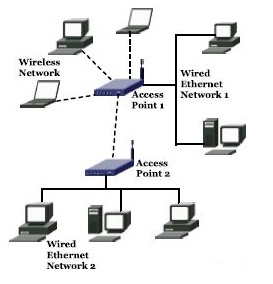
  • Multiple access points – Multiple access points are attached to a wired network by the means of extending LAN with wireless. These networks communicate with wired network as well as wireless access points to fulfill corporate communication requirement.
  • LAN to LAN wireless network – This allows two wireless access points to interconnect two LAN segments via wireless communication. For instance, this will help to extend the corporate communication between two buildings of same organization via wireless technology.


Thursday, October 21, 2010

Key steps in conducting forensic investigations.

Before proceeding with the investigation, forensic investigation team must be well prepared and equipped with necessary prerequisite facilities. Below indicated steps define the steps that the forensic team should adapt to, although the steps are not limited to this.

I. Policy and Procedure development.

Developing proper procedures and policies will give a clear guidance of functional and operational behavior of the forensic unit, and the mission statement that will keep the unit focus on their existence.

· Software licensing – Purchase required softwares and licenses for the forensics unit

· Training – Forensic team requires specialized training for the investigation.

· Resource allocation – Funds and resource allocation

II. Evidence assessment

Forensic investigator must determine the actions to be taken after considering the evidence assessment against the scope of the case.

· Case assessment – Determine whether you need to sought additional evidences such as finger print, DNA analysis, etc.

· Processing location assessment – Identifying the place of the investigation ( In lab environment or onsite)

· Legal considerations - What is the extend of authority to search.

III. Evidence acquisition

Digital evidence has the tendency of getting destroyed, damaged or altered due to its sensitivity, thus protecting and handling them during the entire process is very critical.

· Imaging – Extract the evidence data by fixing the storage device to a forensically cleaned system.

· Write protection – Perform MD5 (Message Digest 5) or CRC (Cyclic Redundancy Check) before and after examination of evidence to determine if the evidence is being tampered during the examination process.

IV. Evidence examination

This process will defer according to the case that the investigator is working on, method, tools to be used and methodology of the investigation. Examination should not perform on original evidence.

· Preparation – Create a unique folder on a separate system to extract evidence data

· Extraction

i. Physical – Extract /recover data of the full physical drive

ii. Logical – Extract and recover data based on operating system, file stucture.ect

iii. Analysis of data – This is the method of matching the relevance of the evidence data to the case that is being examined.

V. Documenting and reporting

All the incidences have to be documented with the timelines of the occurrence from the beginning to the closure of the case and each and every supporting document should be filed accordingly. Final report has to be produced to the case if needed or only to the relevant authority.


Wednesday, October 20, 2010

How to implement Wireless VoIP

Comparatively wireless VoIP is slower than VoIP in wired network. Thus deployment of wireless VoIP needs to consider the real need of wireless VoIP to the corporate network. It is not the point to implement the latest technology but to implement the best system which serves the purpose of the corporate network. Below mentions are basic guidelines for wireless VoIP deployment and this can greatly vary according to the organizational requirements.

1. Make sure the network can handle VoIP.

When moving from wired communication channels to wireless communication channels it is vital to check whether current organizational structure is capable of handling the wireless VoIP requirement adequately and provide the level of expected results. Since data and voice are going to be transmitted through shared medium if the corporate network is also a wireless LAN. Even with the wired data network voice transmission required to be prioritized due to its real time requirement.

Determining the network's readiness for VoIP is essential. A readiness assessment to establish the baseline capabilities of the network will help determine which areas of the overall system need to be fine-tuned or upgraded to support the streaming media requirements of VoIP.

2. Keep the deployment simple.

Deployment of wireless VoIP should take place in parallel or pilot deployment due to the fact that if anything got backfired in the corporate network, it is easy to rectify and resolve without having to shutdown the whole communication lines. This pilot deployment helps to measure the pros and cons of the wireless VoIP implementation and take necessary actions in due places.

3. Create network service maps and update service-level agreements.

During pre-deployment, network administrators should create maps of the network and define service-level agreements with internal departments and external clients. With a proper inventory of the network in the form of a service map, administrators will be able to pinpoint potential bottlenecks and areas of the network that need to be upgraded or extended to support the additional traffic.

Setting requirements in advance is essential, because appropriate expectations and regular feedback between business owners, technology departments and end-users will result in a more successful VoIP experience. Define the policies for ongoing monitoring, performance measurement and management of the network and the VoIP system. Typical SLA metrics include network uptime, application availability, and network and application response time. The data gathered is used to measure pertinent service delivery aspects, such as delay, jitter and uptime, and report confirmation that all requirements and expectations are being met.

4. Consider QoE.

Quality of experience (QoE) is a way to understand the user's perception of the quality of the VoIP telephone systems which can give a correct feedback of the systems that you have implemented. QoE will help measure the success of the wireless VoIP deployment from the end users level.

5. Review, reassess and repeat.

Networks are not static, so implementing an ongoing monitoring process is important. Any change to the infrastructure or usage patterns has an impact to everything on the network. Bringing servers on and offline, upgrading hardware or virtualizing portions of the environment can impact VoIP services.

Continuous monitoring and measurement of IT operations and service-level reporting will provide needed information to quickly resolve network outages and system issues. This technical and business intelligence analysis supports service improvement plans that will sustain the VoIP implementation and make sure end-users do not experience call degradation issues.

Much of the management of the VoIP system and applications can be automated to allow network assessment and monitoring to be repeated consistently to maintain appropriate baselines. Baselines enable administrators to monitor performance and availability, as well as prevent, diagnose and resolve problems.

Wireless Protocols

These are few wireless protocols in use.

Name of the Protocol

Description

WAP (Wireless Application Protocol)

This is an application communication protocol inherited from internet which is used by handheld devices, mobile phones, pagers and two way radios, smart phones, etc. WAP is supported by operating systems such as PalmOS, EPOC, Windows CE, FLEXOS, OS/9, and JavaOS. This protocol is capable of working with wireless networks such as CDPD, CDMA, GSM, PDC and TDM

TKIP (Temporal Key Integrity protocol)

This is a short term fix introduced to WAP which comes as a simple software/firmware upgrade. TKIP identifies all of the WAP weaknesses. This increase the IV (Initialization Vector) to 48 bits and first 4 bits indicate QoS traffic class while remaining 44 bits are used as a counter. TKIP generate new secret keys dynamically and use original secret key as a base.

SWAP (Shared Wireless Access Protocol)

This is developed by HomeRF Working Group for wireless voice and data networking for home environment. SWAP supports TDMA for interactive data transfer and CSMA / CA for high speed packet transfer.

EAP (Extensible Authentication Protocol)

EAP supports multiple authentication methods such as, token cards, smart cards, Kerberos, one time passwords, certificates and public key authentication. There are two EAP variations,

· LEAP (Lightweight Extensible Authentication Protocol) –

This is a proprietary protocol of Cisco which use dynamic Wired Equivalent Privacy (WEP) key that are changed with more frequent authentication between RADIUS server and clients. LEAP intends to provide secure authentication for 802.11 WLAN which supports 802.1x port access control.

· PEAP (Protected EAP) –

This is base on the Internet Draft (I-D) submitted by Cisco, Microsoft and RSA security to IETF. This relies on TLS to allow nonencrypted authentication types and encrypt all user sensitive authentication information.

LDAP (Lightweight Directory Access Protocols)

This is built on X.500 Directory services model and communication has two elements such as client-server and server-server. Few common LDAP server are, IBM DS Series LDAP Directory (AIX), Netscape Directory Server and OpenLDAP server (Linux), etc.

WRAP (Wireless Robust Authentication Protocol)

This is an encryption protocol standard for 802.11i and based on Offset Codebook (OCB) mode of AES. (EC Council)

HDTP (Handheld Device Transport Protocol)

This protocol is optimized for handheld devices and low performance networks and provide security features like, authentication, privacy and integration, counteracting playback attacks, etc. (EC Council)